














- Description
- Minimum Requirements
- Specifications
- Reviews (0)
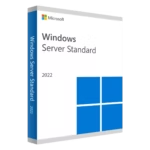
Windows Server 2016 Standard is a 64-bit Windows server platform built for SMBs and IT departments that need secure virtualization, reliable file/print/AD services, and remote access. You get a lifetime license, instant digital delivery, and 100% compliance with EU Directive 2009/24/EC for worry-free deployment.
Overview of Windows Server 2016 Standard
- Platform: Windows (64-bit) server operating system
- Edition: Standard
- License Type: Retail
- Devices: 1 device
- License Duration: Lifetime
- Activation Method: Online activation
- Delivery: Instant digital delivery via email
- Support: Email and remote assistance
- Language Support: Multi-language
- Compliance: Fully legal resale under EU Directive 2009/24/EC
What Is Windows Server 2016 Standard?
Windows Server 2016 Standard is Microsoft’s versatile server OS for domain control, secure application hosting, virtualization with Hyper-V, file and print services, and Remote Desktop Services. You can build a dependable on-premises or hybrid foundation while maintaining familiar Windows administration tools.
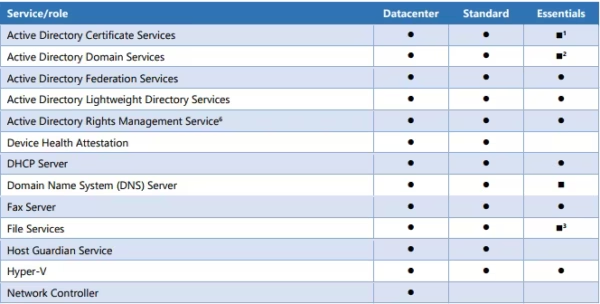
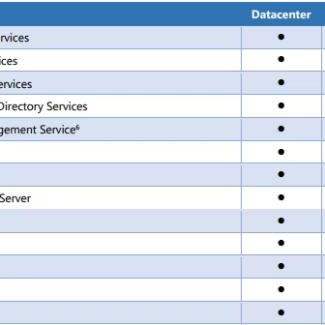
If you need unlimited virtualization rights and advanced software-defined features, consider the Windows Server 2016 Datacenter edition. Browse other releases in the Windows Server category.
Included Features in Windows Server 2016 Standard
- Active Directory Domain Services: Centralize users, groups, and policies to simplify security and access.
- Hyper-V Virtualization: Run up to two OSEs/VMs for efficient workload consolidation on one host.
- Remote Desktop Services (RDS): Deliver apps and desktops securely to users anywhere.
- IIS 10 Web Server: Host modern HTTPS/HTTP/2 websites and APIs with fast, reliable performance.
- Failover Clustering: Increase uptime for critical roles with automatic node failover.
New Features in Windows Server 2016 Standard
- Windows Server Containers: Package apps with dependencies for consistent, portable deployments.
- Nano Server option: Ultra-light, headless installation choice for cloud-first scenarios.
- Hyper-V upgrades: Production checkpoints, rolling cluster upgrades, and enhanced VM configuration.
- Built-in Windows Defender: Always-on malware protection with no extra license required.
- IIS 10 with HTTP/2: Better performance and security for modern web applications.
Key Features & Benefits of Windows Server 2016 Standard
Security & Compliance
You strengthen identity and access with Group Policy, AD-based authentication, and always-on antimalware—helping you meet internal security standards and audits.
Performance & Virtualization
You consolidate workloads on Hyper-V, reduce hardware sprawl, and scale efficiently with improved VM configuration and production-grade checkpoints.
Remote Access Tools
You publish desktops and line-of-business apps over RDS so teams work securely from anywhere without complex VPN setups.
Productivity & Efficiency
You automate routine tasks with PowerShell and use familiar MMC tools to reduce admin time and speed up deployments.
One-Time Ownership
You buy a lifetime license with a retail license key—no subscription—so you control costs and stay compliant under Directive 2009/24/EC.
How to Activate Your Windows Server 2016 Standard License
- Download the software
- Install it on your device
- Go to Settings > Activation
- Enter your product key and activate online
Why Buy Windows Server 2016 Standard from Digital License?
- Instant delivery via email within minutes
- Lifetime license with no subscription
- Remote support and installation help included
- 100% legal resale under EU Directive 2009/24/EC
- Refund guarantee if activation fails
Digital License Is a Verified Microsoft Partner
Digital License is an official Microsoft Partner (ID: 7033487), recognized for delivering genuine software licenses and verified solutions across Europe. You can verify our partnership directly on the Microsoft Partner Directory. This ensures every license you purchase is authentic, secure, and fully compliant with Microsoft standards and EU Directive 2009/24/EC.
FAQs About Windows Server 2016 Standard
- Is this a genuine Microsoft key and will it work for a lifetime?
- Yes—this is a genuine retail key tied to a lifetime license. Once activated, your server remains licensed with no subscription or renewal required.
- Is buying this license 100% legal in the EU?
- Absolutely. Digital License sells legally acquired retail licenses that are 100% legal under EU law, specifically Directive 2009/24/EC governing lawful resale.
- What happens if online activation fails?
- You’re covered by our remote activation support and full refund guarantee if the product cannot be activated after troubleshooting.
- Does this license include media and updates?
- You receive an official product key and a secure download link. Updates come through Windows Update; the lifetime license remains valid.
- Can I reinstall or move the license to new hardware?
- A retail license can be reinstalled and, subject to Microsoft’s terms, transferred to replacement hardware—keeping you compliant and flexible.
- How many virtual machines can I run with Standard?
- Standard licensing grants rights for up to two OSEs/VMs per licensed host. Contact us for planning help via remote activation support.
- Do I need CALs for users or devices?
- Yes. Windows Server requires appropriate Client Access Licenses (CALs). Your retail license for the server OS remains a lifetime license.
- Can I upgrade later to a newer version?
- Yes, many customers in-place upgrade to newer releases. Your purchase today remains 100% legal under EU law and protected by our full refund guarantee if activation issues occur.
Installation & Support for Windows Server 2016 Standard
- Official product key sent via email
- Secure download link from Microsoft or our servers
- Step-by-step instructions included
- Remote setup help available
- Buy with confidence from a verified EU software license reseller
What Does “Retail License” Mean?
A retail license is a transferable, one-time purchase that grants you a lifetime license for one device with no subscription or renewal. Unlike OEM or volume keys tied to specific hardware or agreements, a retail key can be reactivated on replacement hardware (subject to Microsoft’s terms) and is 100% legal under EU law, including Directive 2009/24/EC permitting lawful resale.

| Component | Requirement |
| Processor | 1.4 GHz 64-bit processor or faster; compatible with x64 instruction set; supports NX, DEP, CMPXCHG16b, LAHF/SAHF, PrefetchW, and Second Level Address Translation (SLAT) |
| Memory (RAM) | Minimum: 512 MB for Server Core installation; 2 GB for Server with Desktop Experience |
| Storage | At least 32 GB of available disk space (more recommended depending on configuration, roles, and features installed) |
| Network Adapter | Ethernet adapter with at least 1 Gbps throughput, compliant with PCI Express architecture specification |
| Graphics & Display | Graphics device and monitor capable of Super VGA (1024 × 768) or higher resolution |
| Firmware / Security | UEFI 2.3.1c-based system with Secure Boot; Trusted Platform Module (TPM) 2.0 required for certain security features like BitLocker and Windows Defender Credential Guard |
| Internet Access | Required for updates, activation, and some features such as Windows Admin Center and Azure integration |
| Specification | Detail |
|---|---|
| Activation | Single PC (one-time activation) |
| License validity | Lifetime (does not expire after activation) |
| Delivery method | By email within 15 minutes |
| Languages | Multilingual |
Be the first to review “Windows Server 2016 Standard”

1 – Buy
Shop securely with SSL encryption.

2 – Receive
You will receive the license key and download link.

3 – Download
Download and install the software.

4 – Activate
Enter the license key to the software.
Windows Server 2019 Essentials
Windows Server 2019 RDS 50 Device CALs
Windows Server 2019 RDS 50 User CALs
Windows Server 2022 Essentials
Windows Server 2022 RDS 50 Device CALs
Reviews
There are no reviews yet.